oracle练习范例-1

1.创建基础学生表,并插入数据

2.查询解析:获取每个班级最高分的学生信息

3.修改表结构:增加性别列、出生列、家庭地址列,并补充数据

4.创建性别子表

5.查询解析:将表中性别字段转换为引用的子表数据

6.将第5步,创建为视图

7.修改表结构:增加考试日期,插入当天日期为考试日期,且‘呼呼’、'陈帅'不插入考试日期

第一步,创建范例表

 1
 2
 3
 4
 5
 6
 7
 8
 9
10
11
12
13
14
15
16
17
18
19
20
21
22
23
24
25
26
27
28
29
30
31
32
33
34
35
--删除test表
drop table test;

--创建test表
create table test
(
    CLASS VARCHAR2(20),
    NAME  VARCHAR2(20),
    SCORE INTEGER
);

--test表插入数据
INSERT INTO test ( class, name, score) VALUES ( '1班', '齐静春', 100);
INSERT INTO test ( class, name, score) VALUES ( '1班', '李二', 99);
INSERT INTO test ( class, name, score) VALUES ( '1班', '陈平安', 88);
INSERT INTO test ( class, name, score) VALUES ( '1班', '李柳', 98);
INSERT INTO test ( class, name, score) VALUES ( '1班', '赵耀', 79);
INSERT INTO test ( class, name, score) VALUES ( '2班', '岳东江', 81);
INSERT INTO test ( class, name, score) VALUES ( '2班', '苏杰', 69);
INSERT INTO test ( class, name, score) VALUES ( '2班', '吴杰', 87);
INSERT INTO test ( class, name, score) VALUES ( '2班', '王珂', 77);
INSERT INTO test ( class, name, score) VALUES ( '2班', '杜兰特', 99);
INSERT INTO test ( class, name, score) VALUES ( '2班', '罗斯', 90);
INSERT INTO test ( class, name, score) VALUES ( '3班', '马祖号', 69);
INSERT INTO test ( class, name, score) VALUES ( '3班', '王祖辉', 89);
INSERT INTO test ( class, name, score) VALUES ( '3班', '林冲', 91);
INSERT INTO test ( class, name, score) VALUES ( '3班', '赵卡', 80);
INSERT INTO test ( class, name, score) VALUES ( '3班', '罗帅', 87);
INSERT INTO test ( class, name, score) VALUES ( '4班', '陈旭', 77);
INSERT INTO test ( class, name, score) VALUES ( '4班', '王艳', 71);
INSERT INTO test ( class, name, score) VALUES ( '4班', '呼呼', 89);
INSERT INTO test ( class, name, score) VALUES ( '4班', '陈帅', 78);

--提交事务
commit;
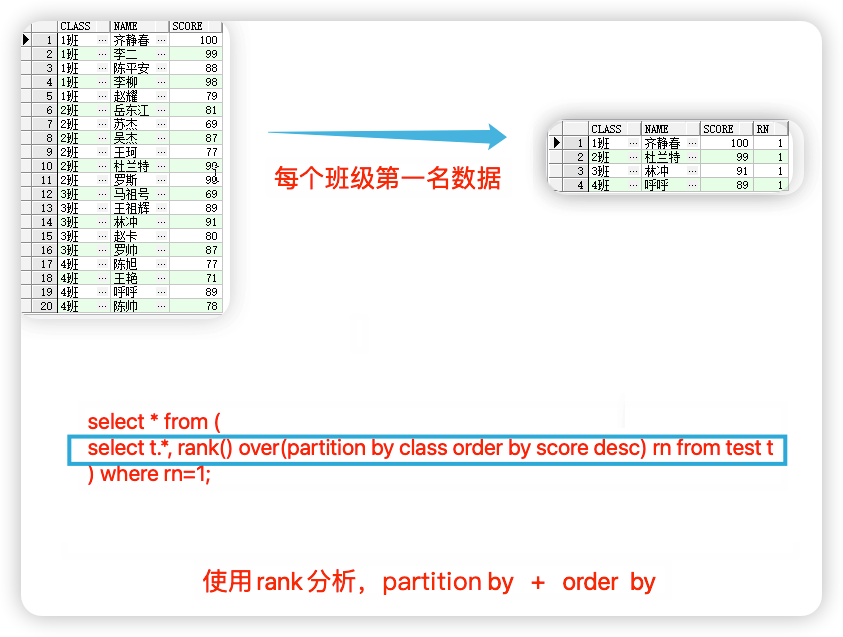
第二步,查询分析:获取每个班级最高分的学生信息

 1
 2
 3
 4
 5
 6
 7
 8
 9
10
11
--查询表
select * from test;

--rank分析,使用partition by + oreder by多数据分析,rn别名是rank的伪列,不能直接使用
select t.*, rank() over(partition by class order by score) rn from test t;

--引入ank分析出的排序是伪列,需要再套一层select,才可以进行条件操作
--order by 降序,获取rn的第一列,也就是最大的值的列
select * from (
select t.*, rank() over(partition by class order by score desc) rn from test t 
) where rn=1;

第三步,修改表结构:增加性别列、地址列

 1
 2
 3
 4
 5
 6
 7
 8
 9
10
11
12
13
14
15
16
17
18
19
20
21
22
23
24
25
26
27
--修改表结构,追加两列:性别、地址
alter table  test add (sex number(1),b_date date,address varchar2(40));

--更新表数据
update  test set sex=0,b_date=to_date('2000-01-05','yyyy-mm-dd'),address='金水区' where name='齐静春';
update  test set sex=1,b_date=to_date('2000-03-06','yyyy-mm-dd'),address='惠济区' where name='李二';
update  test set sex=1,b_date=to_date('2000-11-08','yyyy-mm-dd'),address='经开区' where name='陈平安';    
update  test set sex=0,b_date=to_date('2002-11-25','yyyy-mm-dd'),address='东区' where name='李柳';
update  test set sex=1,b_date=to_date('2001-06-22','yyyy-mm-dd'),address='高新区' where name='赵耀';
update  test set sex=0,b_date=to_date('2000-09-08','yyyy-mm-dd'),address='高新区' where name='岳东江';
update  test set sex=0,b_date=to_date('2002-01-01','yyyy-mm-dd'),address='金水区' where name='苏杰';
update  test set sex=0,b_date=to_date('2001-03-15','yyyy-mm-dd'),address='新郑' where name='吴杰';
update  test set sex=1,b_date=to_date('2001-09-16','yyyy-mm-dd'),address='巩义' where name='王珂';
update  test set sex=0,b_date=to_date('2002-04-22','yyyy-mm-dd'),address='巩义' where name='杜兰特';
update  test set sex=1,b_date=to_date('2003-01-19','yyyy-mm-dd'),address='金水区' where name='罗斯';
update  test set sex=0,b_date=to_date('2002-12-30','yyyy-mm-dd'),address='金水区' where name='马祖号';
update  test set sex=0,b_date=to_date('2003-07-14','yyyy-mm-dd'),address='荥阳' where name='王祖辉';
update  test set sex=1,b_date=to_date('2002-08-08','yyyy-mm-dd'),address='登封' where name='林冲';
update  test set sex=1,b_date=to_date('2000-09-13','yyyy-mm-dd'),address='上街' where name='赵卡';
update  test set sex=1,b_date=to_date('2004-09-02','yyyy-mm-dd'),address='中牟' where name='罗帅';
update  test set sex=0,b_date=to_date('2003-01-05','yyyy-mm-dd'),address='中牟' where name='陈旭';
update  test set sex=0,b_date=to_date('2005-02-16','yyyy-mm-dd'),address='上街' where name='王艳';
update  test set sex=0,b_date=to_date('2001-01-05','yyyy-mm-dd') where name='呼呼';
update  test set sex=0,b_date=to_date('2002-02-16','yyyy-mm-dd') where name='陈帅';

--提交数据
commit;

第四步,创建性别子表

 1
 2
 3
 4
 5
 6
 7
 8
 9
10
--删除字表
drop table t_sex;

--创建性别子表
create table t_sex (sex number(1),xingbie varchar2(20));

--插入数据
insert into t_sex values (0,'男');
insert into t_sex values (1,'女');
commit;

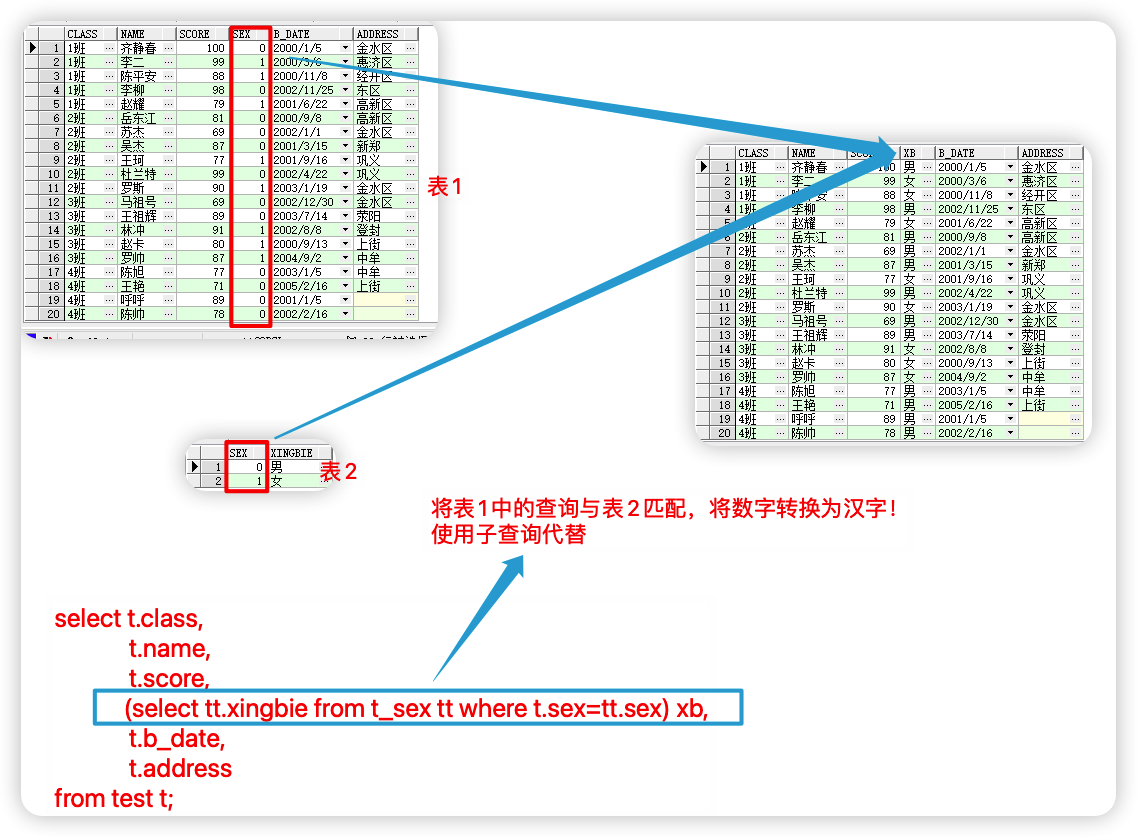
第五步,查询解析:将表中性别字段转换为引用的子表数据

 1
 2
 3
 4
 5
 6
 7
 8
 9
10
--将性别字段转为子表查询结果
select t.*,(select tt.xingbie from t_sex tt where t.sex=tt.sex) xb from test t;
--对字段排序
select t.class,
       t.name,
       t.score,
       (select tt.xingbie from t_sex tt where t.sex = tt.sex) xb,
       t.b_date,
       t.address
  from test t;

第六步,将第5步查询语句,创建为视图

 1
 2
 3
 4
 5
 6
 7
 8
 9
10
11
12
13
14
15
16
17
18
19
20
--切换dba角色为用户授权创建视图权限
--grant 权限 to 用户名
grant create view to scott;


 --将将第5步查询语句创建视图
 create view v_test as (
 select t.class,
       t.name,
       t.score,
       (select tt.xingbie from t_sex tt where t.sex = tt.sex) xb,
       t.b_date,
       t.address
  from test t
 
 );
 
 
 --查看视图
 select * from v_test; 

第七步,修改表结构:增加考试日期,插入当天日期为考试日期,且‘呼呼’、'陈帅'不插入考试日期

 1
 2
 3
 4
 5
 6
 7
 8
 9
10
--修改表结构:增加考试日期,插入当天日期为考试日期,且‘呼呼’、陈帅不插入考试日期
--添加考试时间列
alter table test add ks_date date;
--更新整列,排除呼呼和陈帅
update test set ks_date=sysdate where name not in ( '呼呼','陈帅');
--提交
commit;

--查询
select * from test;