魔改文件路径:**themes\butterfly\layout\includes\rightside.pug**

魔改文件路径:themes\butterfly\layout\includes\rightside.pug

一,美化

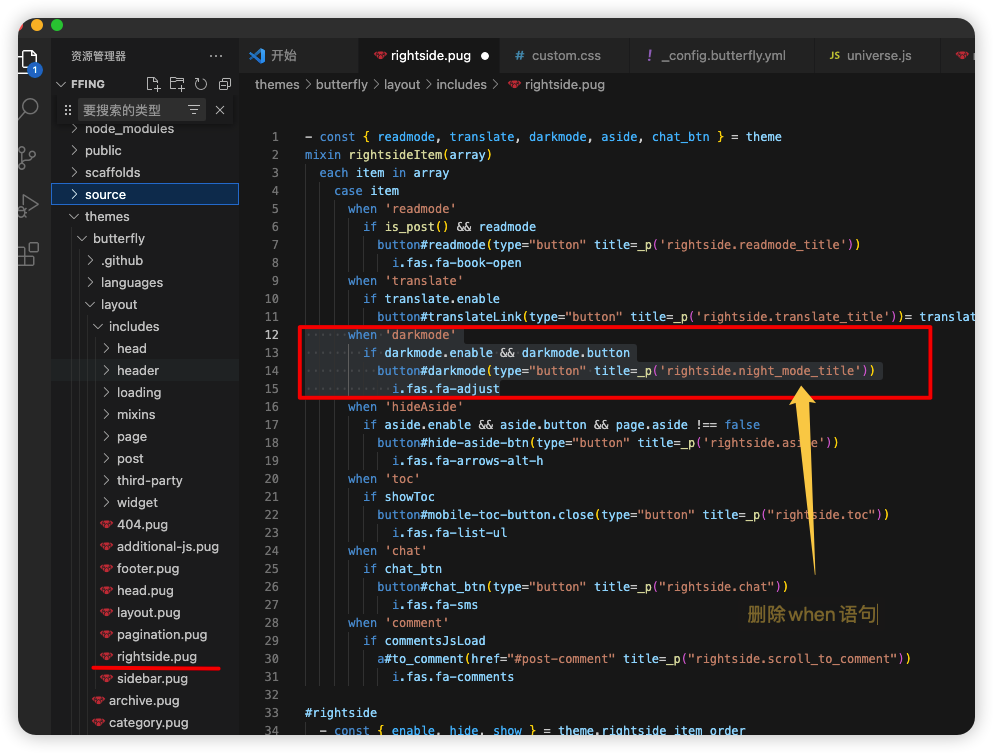
第一种美化,仅删除“主题模式”切换按钮

删除包含darkmode的when语句

1
2
3
4
-      when 'darkmode'
-        if darkmode.enable && darkmode.button
-          button#darkmode(type="button" title=_p('rightside.night_mode_title'))
-            i.fas.fa-adjust

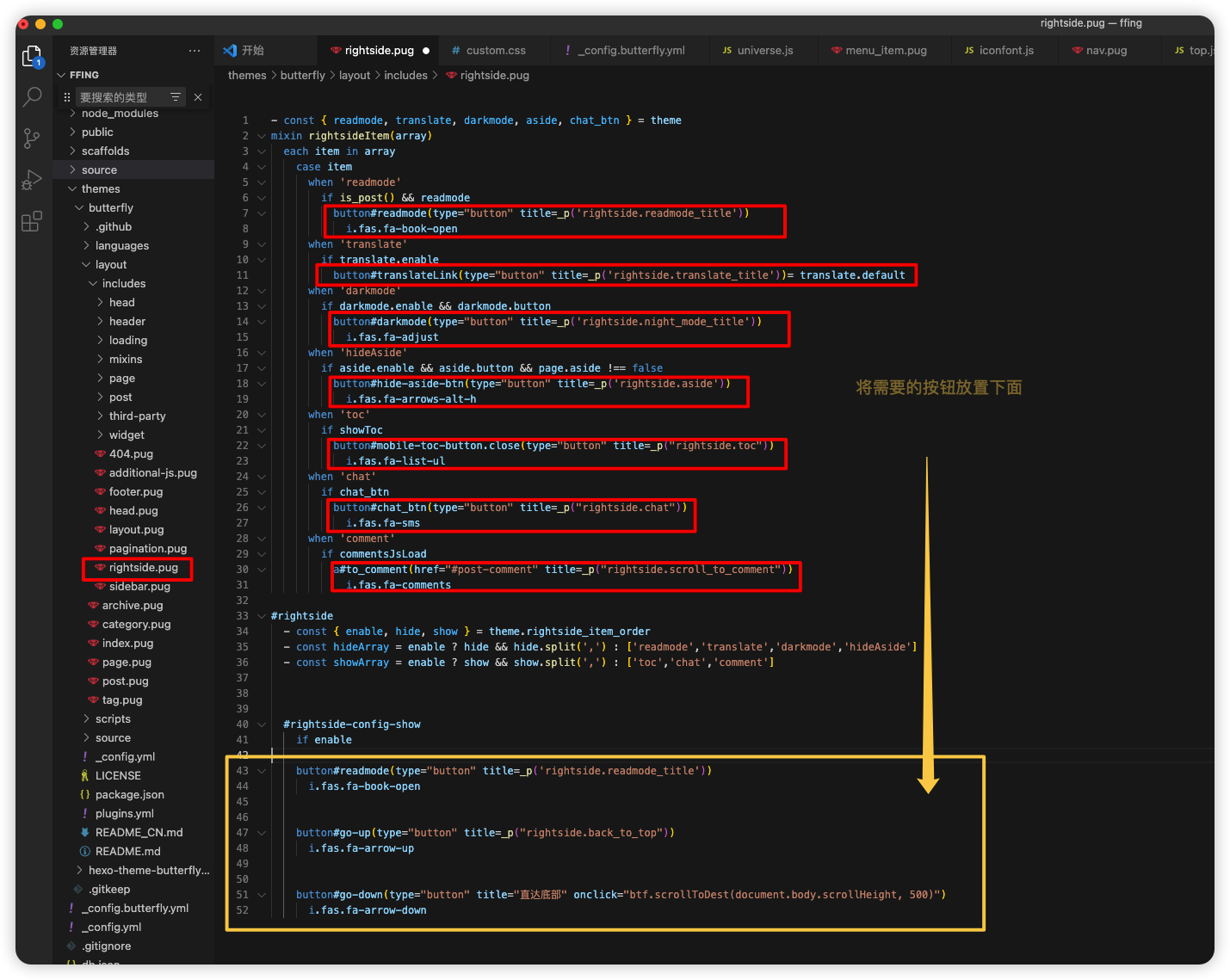
第二种美化,按需求添加按钮

删除原有的if判断,直接将上面的按钮放置下面

 1
 2
 3
 4
 5
 6
 7
 8
 9
10
11
12
13
14
15
16
17
18
19
20
21
22
23
24
25
26
27
28
29
30
31
32
33
34
35
36
37
38
39
40
41
42
43
44
45
46
47
48
49
50
51
52
- const { readmode, translate, darkmode, aside, chat_btn } = theme
mixin rightsideItem(array)
  each item in array
    case item
      when 'readmode'
        if is_post() && readmode
          button#readmode(type="button" title=_p('rightside.readmode_title'))
            i.fas.fa-book-open
      when 'translate'
        if translate.enable
          button#translateLink(type="button" title=_p('rightside.translate_title'))= translate.default
      when 'darkmode'
        if darkmode.enable && darkmode.button
          button#darkmode(type="button" title=_p('rightside.night_mode_title'))
            i.fas.fa-adjust
      when 'hideAside'
        if aside.enable && aside.button && page.aside !== false
          button#hide-aside-btn(type="button" title=_p('rightside.aside'))
            i.fas.fa-arrows-alt-h
      when 'toc'
        if showToc
          button#mobile-toc-button.close(type="button" title=_p("rightside.toc"))
            i.fas.fa-list-ul
      when 'chat'
        if chat_btn
          button#chat_btn(type="button" title=_p("rightside.chat"))
            i.fas.fa-sms
      when 'comment'
        if commentsJsLoad
          a#to_comment(href="#post-comment" title=_p("rightside.scroll_to_comment"))
            i.fas.fa-comments

#rightside
  - const { enable, hide, show } = theme.rightside_item_order
  - const hideArray = enable ? hide && hide.split(',') : ['readmode','translate','darkmode','hideAside']
  - const showArray = enable ? show && show.split(',') : ['toc','chat','comment']


  #rightside-config-show
    if enable

    button#readmode(type="button" title=_p('rightside.readmode_title'))
      i.fas.fa-book-open


    button#go-up(type="button" title=_p("rightside.back_to_top"))
      i.fas.fa-arrow-up


    button#go-down(type="button" title="直达底部" onclick="btf.scrollToDest(document.body.scrollHeight, 500)")
      i.fas.fa-arrow-down
右下角,添加按钮

添加“直到底部”按钮,追加到最后

1
2
    button#go-down(type="button" title="直达底部" onclick="btf.scrollToDest(document.body.scrollHeight, 500)")
      i.fas.fa-arrow-down
添加“阅读百分比”进度,追加最后

第一步,修改themes\butterfly\layout\includes\rightside.pug

在up下面追加+号内容

1
2
3
4
    button#go-up(type="button" title=_p("rightside.back_to_top"))
      i.fas.fa-arrow-up
+      span#percent 0
+        span %

第二步,添加source/js文件(需引入主题配置文件)

 1
 2
 3
 4
 5
 6
 7
 8
 9
10
11
12
13
14
15
16
17
window.onscroll = percent;// 执行函数
// 页面百分比
function percent() {
    let a = document.documentElement.scrollTop || window.pageYOffset, // 卷去高度
        b = Math.max(document.body.scrollHeight, document.documentElement.scrollHeight, document.body.offsetHeight, document.documentElement.offsetHeight, document.body.clientHeight, document.documentElement.clientHeight) - document.documentElement.clientHeight, // 整个网页高度
        result = Math.round(a / b * 100), // 计算百分比
        up = document.querySelector("#go-up") // 获取按钮

    if (result <= 95) {
        up.childNodes[0].style.display = 'none'
        up.childNodes[1].style.display = 'block'
        up.childNodes[1].innerHTML = result;
    } else {
        up.childNodes[1].style.display = 'none'
        up.childNodes[0].style.display = 'block'
    }
}

第三步,添加source/css文件(需引入主题配置文件)

 1
 2
 3
 4
 5
 6
 7
 8
 9
10
11
12
13
14
15
16
17
18
19
20
21
/* 返回顶部 */

button#go-up #percent {
    display: none;
    font-weight: bold;
    font-size: 15px !important;
}

button#go-up span {
    font-size: 12px!important;
    margin-right: -1px;
}

/* 鼠标滑动到按钮上时显示返回顶部图标 */
button#go-up:hover i {
    display: block !important;
}

button#go-up:hover #percent {
    display: none !important;
}

添加“分享链接”按键

第一步,添加“分享”按钮

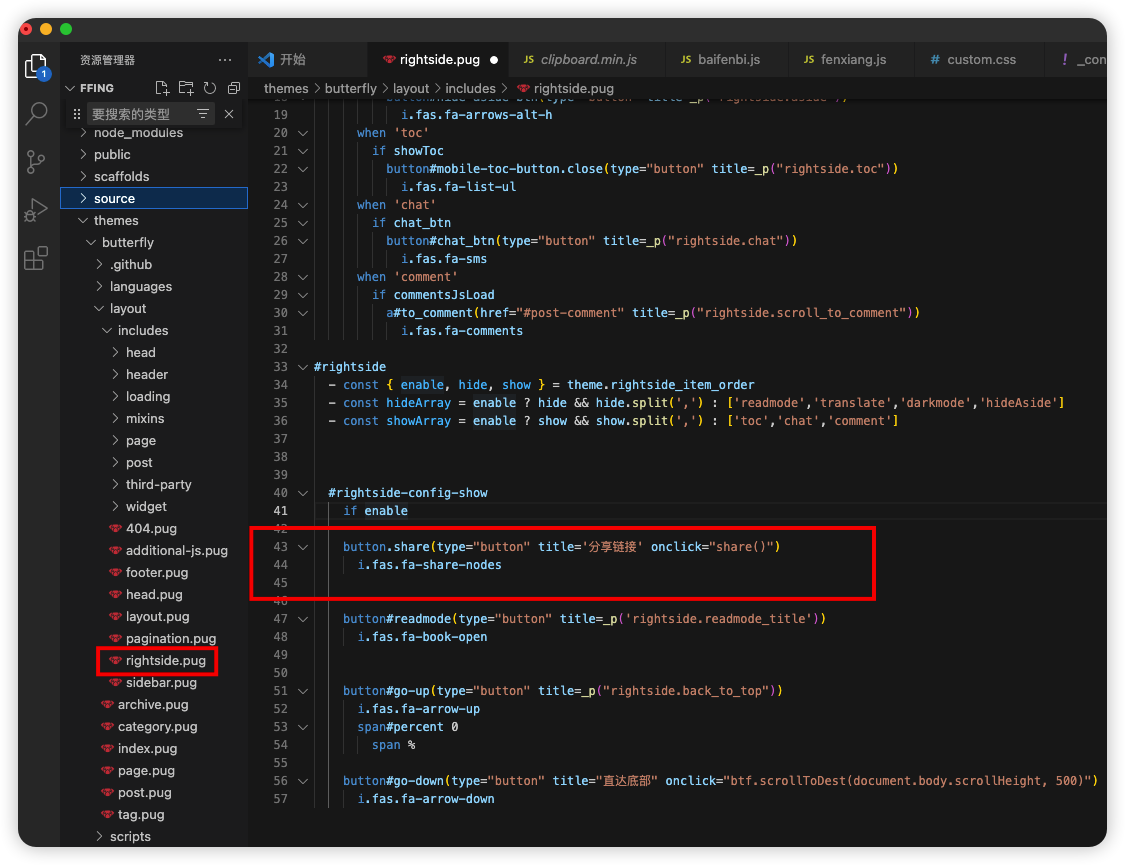
修改

再if enable下增加按钮

1
2
    button.share(type="button" title='分享链接' onclick="share()")
      i.fas.fa-share-nodes

第二步,source/js目录下新增js(需引入主题配置)

clipboard.min.js

第三步,source/js目录下新增第二个js也可以和上面的js放一个文件(需引入主题配置)

1
2
3
4
5
6
// 分享本页
function share() {
    let url = window.location.origin + window.location.pathname
    new ClipboardJS(".share", { text: function() { return '标题:' + document.title + '\n链接:' + url } });
    btf.snackbarShow("本页链接已复制到剪切板,快去分享吧~")
}